Free custom firmware for the M-VAVE FM-1

DX7 sound and
drums you program.

sloopDX turns the FM-1 into a six-operator DX7 with cutoff and resonance on every voice, and an FM drum machine where you shape each of the 16 drums right on the device: tune, decay, noise, pan and more. Patterns run up to 128 steps. Load your own DX7 banks, edit every voice on the FM-1.

Chrome or Edge, the FM-1 on USB. Free and open source (GPL-3.0), unofficial, at your own risk. Going back to the original firmware is possible.

16×8drum sounds × macros
CUT·RESOon every FM voice
128steps per track
6-OPDexed's DX7 engine

See and hear it

Under two minutes: the FM edit screen with cutoff and resonance turned as you hear them, the voices in a progression, the drums tuned and shaped on the FM-1, 128 steps, the effects (the four sends as dials, DIST's four types), then OMNI: chords on the black keys, strings on the white ones, a bass that follows, all of it recorded and played back. Every sound is played by the firmware's own engine.

Screens rendered from the firmware's drawing code, sound rendered by its engine. No Yamaha voice data. Also on YouTube.

Highlights

Drum sounds with macros

16 FM drums with TUNE, DECAY, SWEEP, BRIGHT, NOISE, LEVEL, PAN, CHOKE and a reverb send, edited on the FM-1. Locks per step, a kit dice, MY KIT as .syx.

OMNI: a chord harp

New in 2.5: chord buttons on the black keys, strings on the white ones, a bass that follows the chords. Swipe, and nothing sounds wrong.

One page per effect

Tap FX: first SENDS, the four sends as dials in a row, then DIST (drive, tone, SOFT / HARD / FUZZ / CRUSH, mix), CHORUS, DELAY and REVERB with pre-delay. The track's send always on KNOB 1.

FM with cutoff and resonance

A low-pass behind every DX7 voice: CUT and RESO on KNOB 1 and 2, moved by envelope and LFO. Open, the patch sounds as written.

Up to 128 steps per track

The four tracks share 256 steps: two of 128, or 128 + 64 + 32 + 32, or four of 64. OCT− / OCT+ page through them.

A six-operator engine from Dexed

32 algorithms, envelopes, keyboard scaling, LFO, feedback. Ported to the FM-1's chip, 99 % of samples identical to Dexed.

Voice editing on the device

Every DX7 parameter as a list, the algorithm drawn as boxes, operators switched off to listen. The web editor has it on one page.

256 voices from your banks

Eight banks of 32 from any DX7 .syx dump, plus 20 factory voices with modern basses: DEEP SUB, 808 SUB, REESE.

SLOOP's live workflow

Layers, free takes, ratchets, chords, song mode, punch-in effects, MIDI in and clock, USB audio, full backup.
New in 2.1 and 2.2

A drum machine you program.

Every one of the 16 drum sounds is a DX7 voice, and it is yours to shape on the FM-1: tune it, stretch it, add noise, pan it, lock it per step. Keep the result as MY KIT, share it as a .syx, or roll a whole new kit with the dice. And a pattern can run up to 128 steps: the four tracks share 256, so two tracks of 128, or 128 + 64 + 32 + 32, or four of 64.

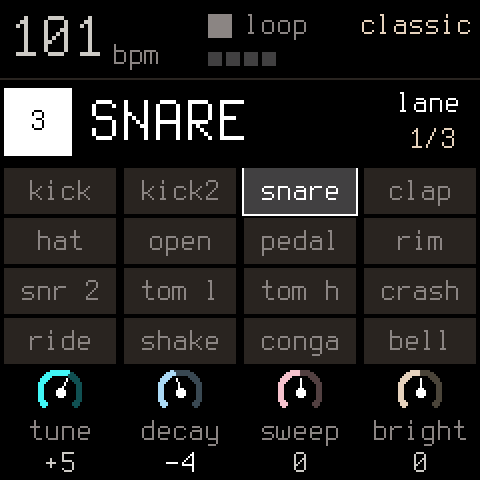
The lane page: TUNE, DECAY, SWEEP, BRIGHT of the snare
Eight macros per soundOn the kit page tap EDIT: the sound you last played. TUNE, DECAY, SWEEP and BRIGHT on the knobs, the value in the bar while you turn.
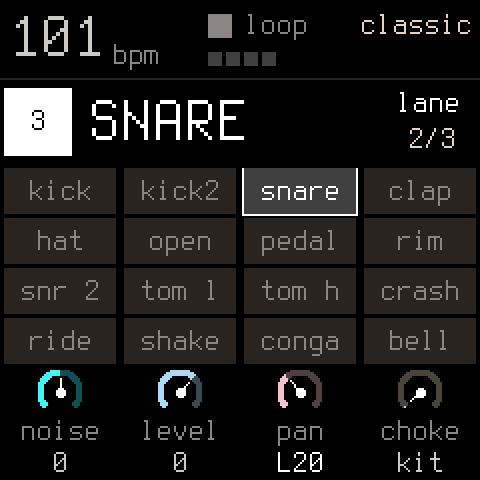
The second page: NOISE, LEVEL, PAN, CHOKE
A real noise operatorPRESETS turns the page: NOISE, LEVEL, PAN, CHOKE, then its own reverb send. Noise is a drums-only operator mode: snares, claps and hats hiss like they should.
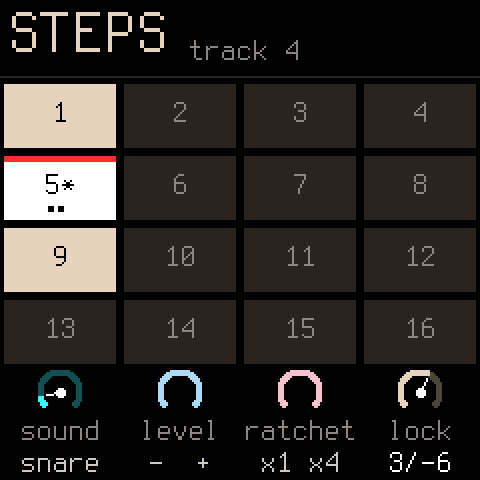
Steps with a lock: step 5 marked with a star
Locks per stepHold SEQ and a step: KNOB 4 locks TUNE, PRESETS locks DECAY, for that hit only. A star marks it. Rolling toms, a shorter snare on the offbeat.
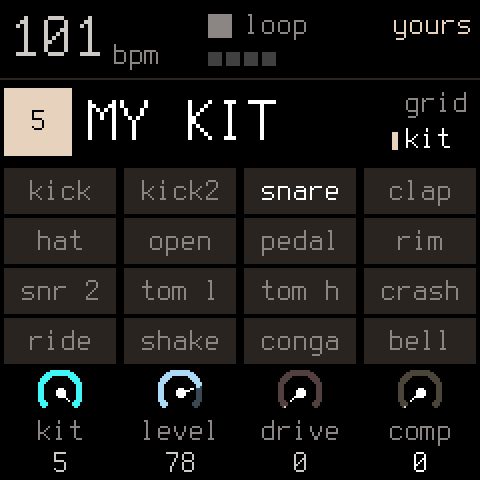
MY KIT after the dice, seed in the corner
MY KIT and the diceLane page 3: KNOB 3 rolls a new kit from rules per sound, KNOB 4 just the sound you edit (turn twice to confirm); the seed rolls a kit again. SAVE twice keeps any kit with your edits in flash; the editor loads and saves it as a .syx.

Why sloopDX

I bought the FM-1 for a DX7 sound.

A real FM synth in a little box: out of the box, the FM-1 is exactly that. Then two projects took it further. Baud Girl's FM-1+VA turned the sequencer into something much better and lets you program the FM sound on the device, with a list for every parameter. SLOOP turned it into a groovebox you play live, with a sequencer, layers and song mode that are a joy to use, but without the FM sound. I wanted the FM back.

sloopDX combines both: SLOOP's live workflow, with a DX7 inside. Dexed's DX7 core, ported to the FM-1's chip; voice editing in the DX7's own names after Baud Girl's list idea; your banks as they are; and FM drums. — zvenson

New in 2.5

OMNI: a chord harp on the keys.

Set a synth track's ARP MODE to OMNI and the FM-1 plays like an Omnichord. One hand presses chords on the black keys, the other swipes the white keys: a harp glissando over the chord's tones, so nothing sounds wrong. Record the chords and they play back as a progression; set a bass track to FLW and it walks with them.

12345678910111213141516FCGDmAmEmG7E7D7BbA7BLACK KEYS: CHORD BUTTONSWHITE KEYS: 16 STRINGS, LOW TO HIGH, SWIPE →
  1. Turn it on. Select a synth track, tap ARP, turn KNOB 1 (MODE) to OMNI. Pick a ringing voice: PLUCK, KOTO, BELLS.
  2. Chords. The black keys: F C G · Dm Am · Em G7 E7 · D7 Bb · A7 (TRN transposes them). The bar names the chord.
  3. Strum. Swipe the white keys. Change the chord while it rings.
  4. A band. Record the chords, set a bass track to FLW, let the drums run: you strum on top.

A real DX7 in a groovebox

sloopDX keeps everything SLOOP does live (tracks, layers, sequencer, song mode, effects) and replaces its engines with one: the DX7 voice of Dexed's msfa core, ported to the FM-1's chip and checked against Dexed sample by sample.

6×32

DX7 engine

Six operators, 32 algorithms, rate / level envelopes, keyboard scaling, pitch envelope, LFO and feedback. 99 % of samples identical to Dexed. Plus a low-pass behind each voice (CUT, RESO).

EDIT

Voice editing on the device

A list in the DX7's own names: algorithm drawn as boxes, every operator's level, ratio, detune, envelope and scaling. SAVE stores it.

256

Your banks

Eight banks of 32 voices from any DX7 .syx dump, switched like cartridges. PRESETS runs from 01 to 52 in one go: 20 factory voices, among them DEEP SUB, 808 SUB and REESE, then your bank.

5 kits

FM drums

DX KIT, 808 FM, ELECTRO, METAL and MY KIT, 16 FM voices each on the white keys: pitch sweeps, a real clap, hat choke, noise. Eight macros and a reverb send per sound, step locks, drive and compression on the bus.

3+1

SLOOP's live workflow

Three synth tracks and a drum track, free takes without a click, ratchets, rolls, scales and chords, song sections, 16 punch-in effects.

USB

Editor, MIDI, audio

A web editor with a Dexed-style voice page, MIDI in on USB and the jack, MIDI clock, and the FM-1 as a USB audio input.

On the screen

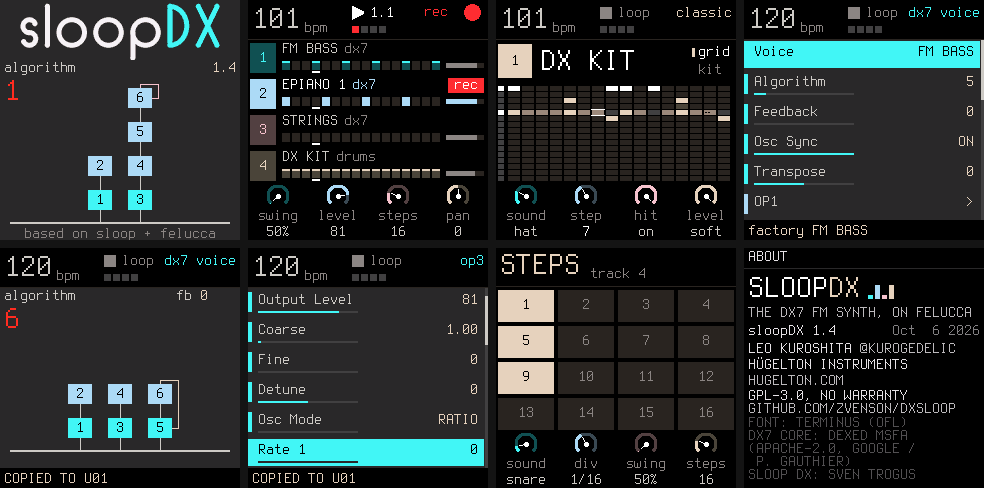
Start-up with the 32 algorithms, the tracks, the FM drum grid, the DX7 voice list, an algorithm, an operator, the step layer, about.

sloopDX screens on the FM-1

Host renders of the firmware's own drawing code, in the DX7 panel colours.

Two pages, A4

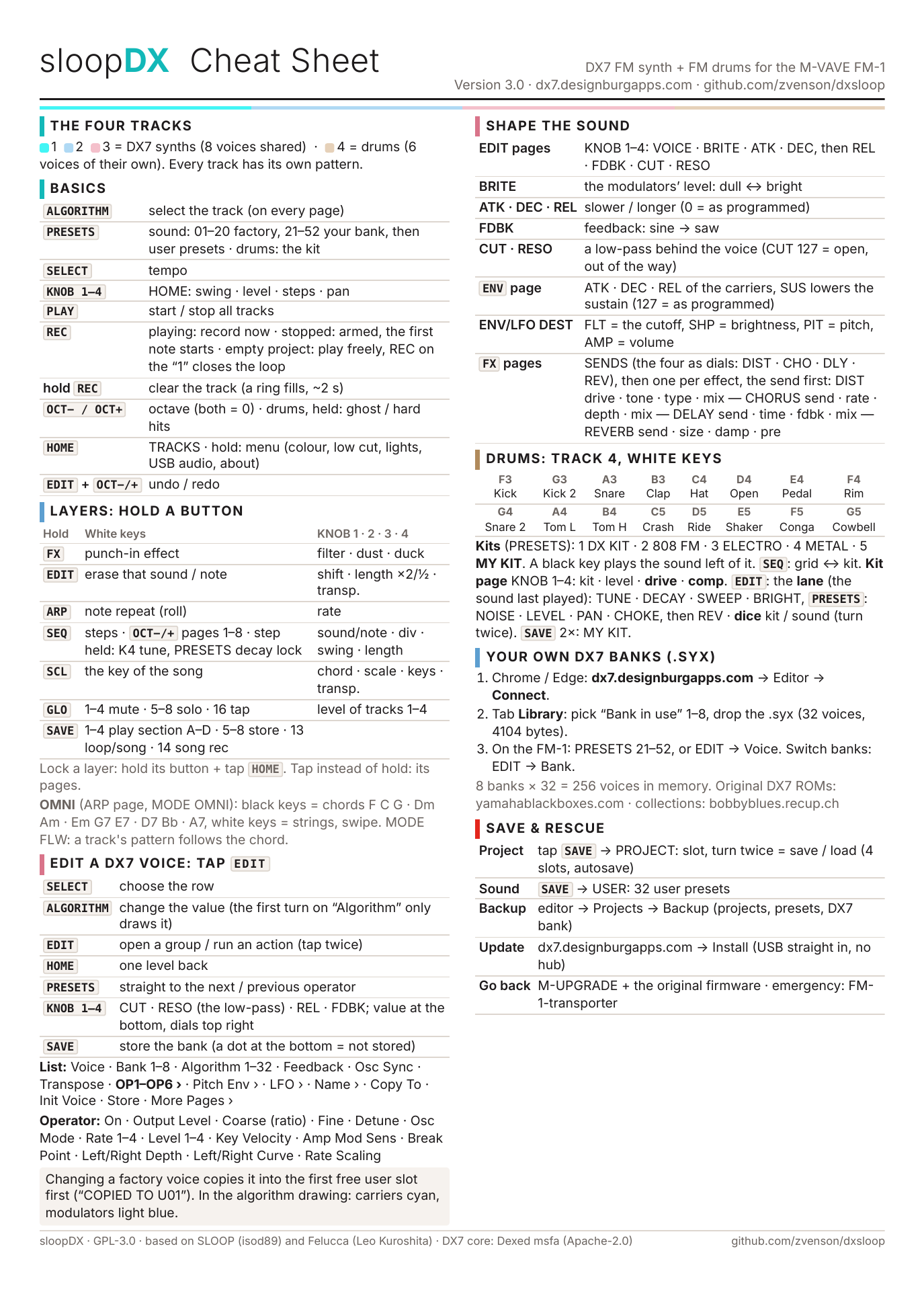
sloopDX Cheat Sheet

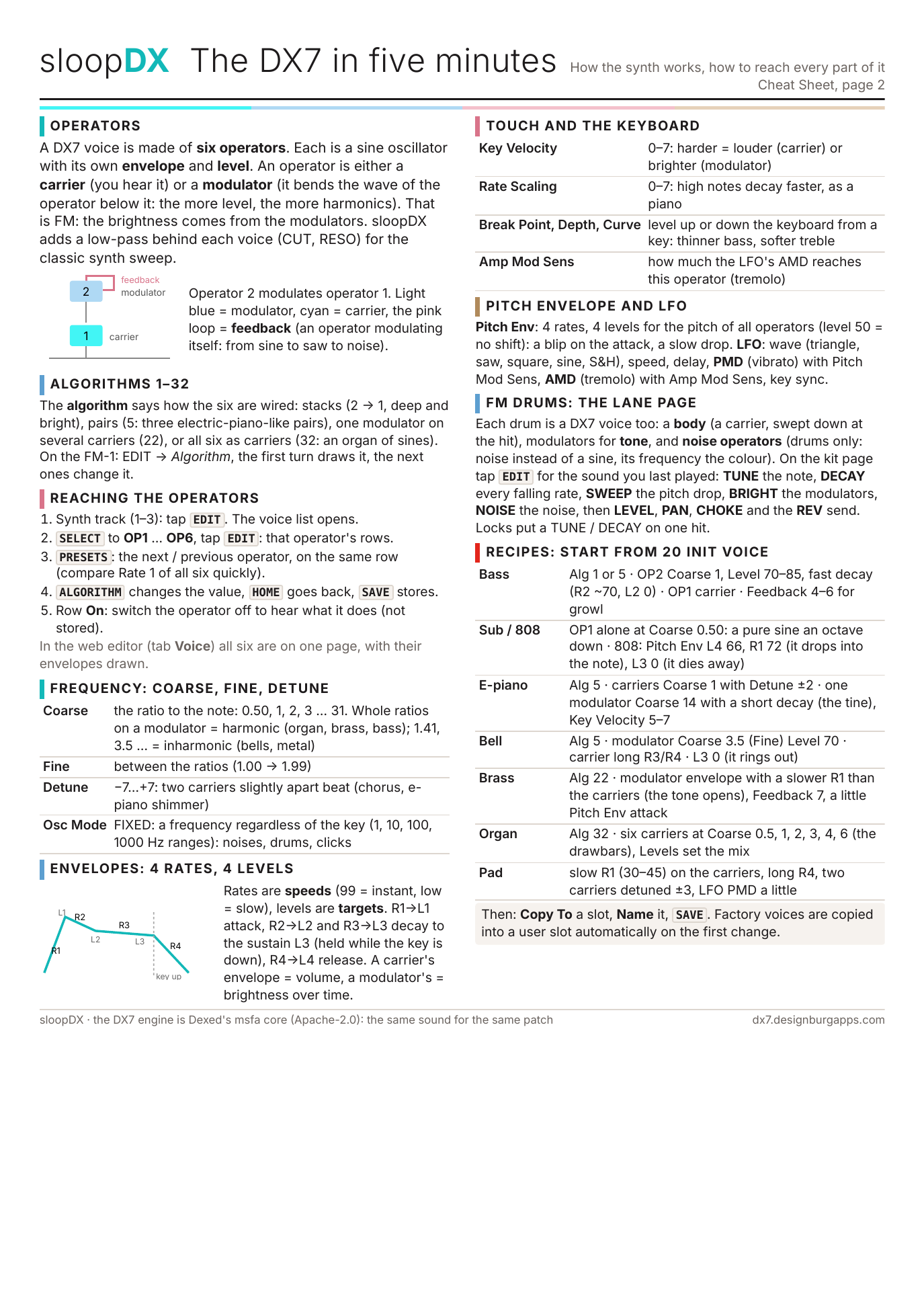
Page 1: every control of the FM-1. Page 2: the DX7 in five minutes, how FM works, how to reach each operator, and recipes to start from.

  • The controls and what every knob does
  • The layers: hold a button, play the keys
  • DX7 voice editing, operator by operator
  • Shaping the sound: BRITE, ENV, LFO
  • The 16 drum keys and the four kits
  • Loading your .syx banks, saving, rescue
  • Page 2: operators, algorithms, envelopes, recipes

Get started

Four steps, about two minutes.

  1. Connect

    The FM-1 on USB, straight into the computer (no hub). Chrome or Edge.

  2. Install

    Open the installer and press Install. The FM-1 restarts twice; the DX7 algorithms go by on its screen.

  3. Play

    ALGORITHM picks a track, PRESETS a sound, REC records without a click. Tap EDIT on a synth track to open the DX7 voice.

  4. Load your banks

    In the editor, tab Library: choose a bank 1–8 and drop a .syx. Original DX7 ROMs: yamahablackboxes.com.

!

Use at your own risk. sloopDX is unofficial, custom firmware, free and without any warranty. Installing it replaces the FM-1's firmware; an interrupted update can leave the device unable to start. Back up your projects and banks first. The author accepts no liability for damage or data loss. Disclaimer & Impressum

Questions about the FM-1 firmware

What is sloopDX?

sloopDX is free, open source custom firmware for the M-VAVE FM-1 that turns it into a six-operator DX7 FM synthesizer with FM drums, based on SLOOP and Felucca and on the msfa engine of Dexed.

How do I install custom firmware on the M-VAVE FM-1?

Connect the FM-1 by USB, open the sloopDX web installer in Chrome or Edge and press Install. It takes about a minute; the FM-1 restarts twice.

Can I load DX7 .syx banks?

Yes. sloopDX loads standard DX7 32-voice bulk dumps (.syx, 4104 bytes) into 8 banks, 256 voices, from the web editor or a command line tool.

Can I edit DX7 voices on the FM-1?

Yes: algorithm, feedback and every operator's level, ratio, detune, envelope and keyboard scaling, on the device and in the web editor.

Can I program the drums?

Yes. Every one of the 16 FM drum sounds has eight macros on the FM-1 (tune, decay, sweep, bright, noise, level, pan, choke) and its own reverb send; steps can lock tune and decay; MY KIT keeps your kit in flash and as a .syx, and the dice rolls a new kit from a seed.

Can I go back to the original FM-1 firmware?

Yes, with M-VAVE's own updater (M-UPGRADE) and the official firmware, or from the installer page.

Is it safe?

It is unofficial firmware, free and without warranty, installed at your own risk. Back up your projects first and do not unplug the FM-1 while it writes.